Links people trust before they click.
Add your domain, one CNAME record, and SSL provisions automatically. Every link you share carries your brand, not ours.
- 1 custom domain on Free
- On Free, once your account is 7 days old
- CNAME verified, certificate issued for you
Live in three steps
No infrastructure knowledge required. If you can paste a DNS record, you are done.
Step 01
Add a subdomain you own
Add a subdomain you own, such as go.yourcompany.com, in the dashboard
Step 02
Add two DNS records
Add two DNS records at your registrar: a CNAME that routes your traffic and a TXT that proves the domain is yours
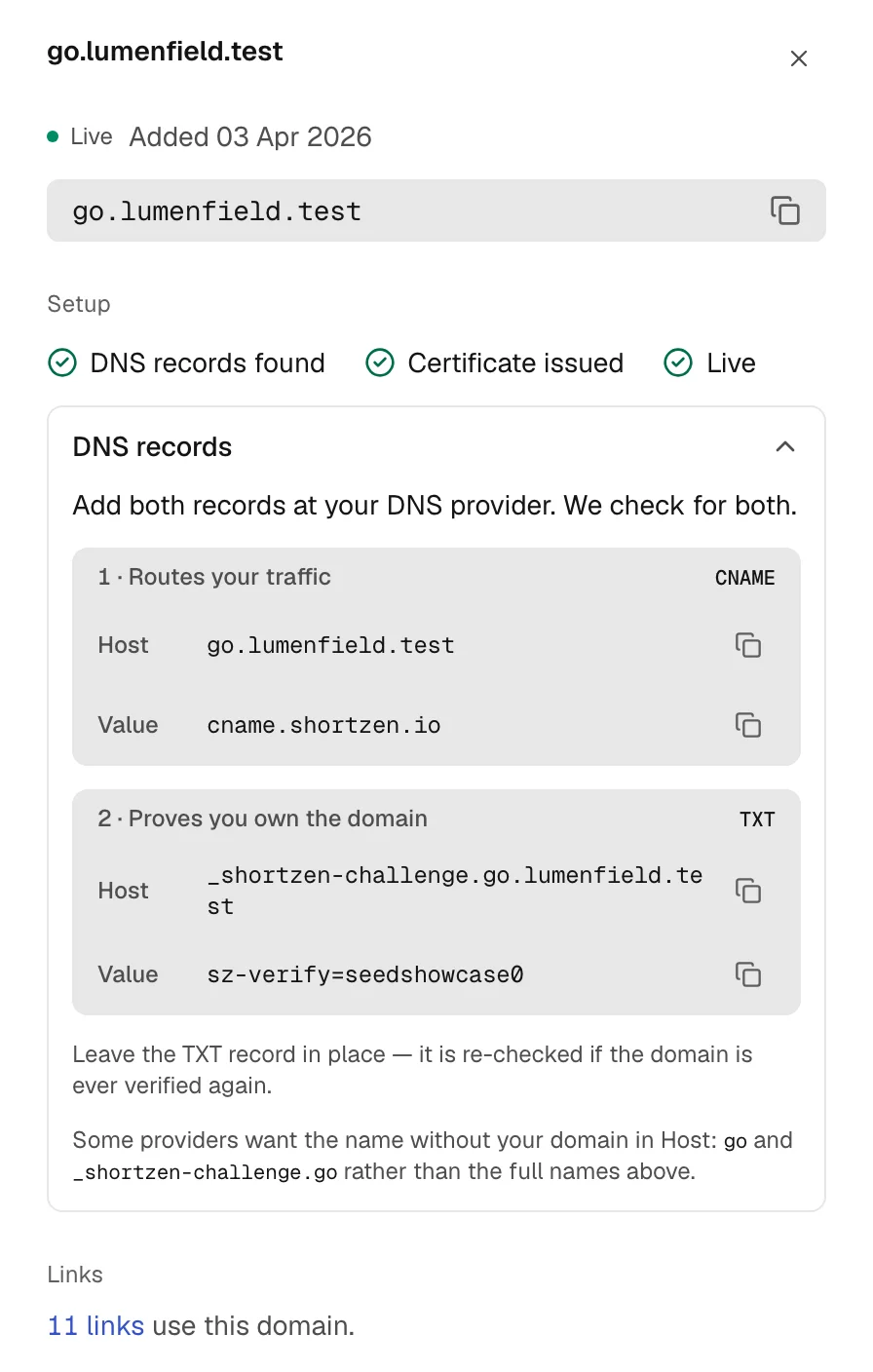
The records, as the product shows them. Step 03
Certificate issued, link live
A managed SSL certificate is provisioned when the CNAME goes live, and renews on its own


What you add at your registrar
Both are shown with copy buttons once you add the domain. Most registrars apply them within minutes.
- CNAME
- go points to cname.shortzen.io
- TXT
- _shortzen-challenge.go holds the value shown when you add the domain
Your DNS record, not ours
- You own the domain
- ShortZen does not register or hold your domain. It is your DNS record pointing at us, not the other way around.
- Move whenever you like
- The CNAME target (cname.shortzen.io) stays the same wherever you manage your DNS, so changing registrar or provider changes nothing you have to add.
- Your name on every link
- Recipients see your domain in the address bar, in email, social posts, print and QR codes alike.
- More domains as you grow
- Custom domains by plan: 1 on Free (once your account is 7 days old), 3 on Starter, 10 on Pro, 50 on Business.
Questions, answered
What are the rules for the Free plan’s domain?
One custom domain per owner, across all their Free workspaces, available once your account is 7 days old. The domain must have been registered for at least 30 days, and every destination is screened for malware and phishing.
How long does DNS propagation take?
It depends on your DNS provider. ShortZen keeps checking the record, shows each check on the Domains page, and turns on SSL once the record resolves.
Can I use an apex domain (e.g. acme.com) instead of a subdomain?
Apex domains cannot use a CNAME record. DNS standards forbid it. Use a subdomain such as go.yourbrand.com or links.yourbrand.com instead. Your apex domain remains unaffected.
What happens to my links if I remove the branded domain?
The destination keeps working, but the short URL changes: links on that domain are automatically reassigned to your workspace’s next active default domain, or to s.shortzen.io if none is set. Update any links you’ve already shared to point at the new short URL.
Is SSL free?
Yes. A managed SSL certificate is provisioned automatically at no extra charge on every verified custom domain. It renews automatically without any action required from you.
Can I move my domain to a different registrar?
Yes. The CNAME target (cname.shortzen.io) stays the same wherever you manage your DNS. Recreate the CNAME record at the new DNS host before you switch, and your links keep working.
Your brand on every link, set up in minutes
It stays your DNS record pointing at us. Take the domain back and your links move to your next default domain.