Click analytics. No tracking code. No cookies.
Click totals and country, device, and (on Pro) referrer breakdowns refresh every hour, all without touching your visitor’s browser.
- 30 days of history on Free
- Counted at the redirect, with no snippet
- Country, device and hour
See what brought the clicks.
Totals and every breakdown refresh each hour.
Step 01
A click is counted
Every click is counted at the redirect, with no snippet on your site.
Step 02
Read it your way
Click totals, unique visitors and QR scans for any date range, with country, device and (on Pro) referrer breakdowns.
Step 03
See what changed
Every link ranked against the period before, so a change shows up as a number.
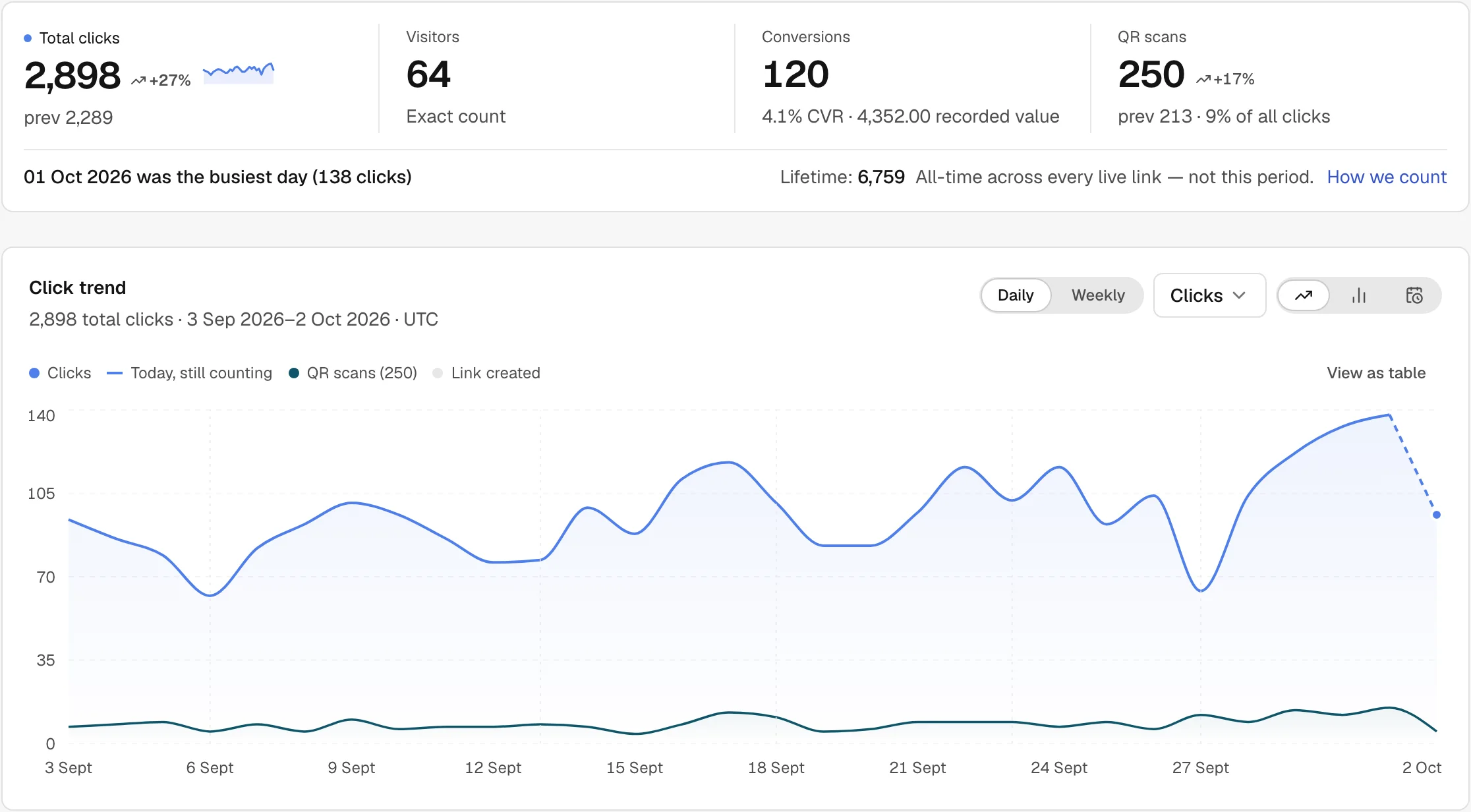
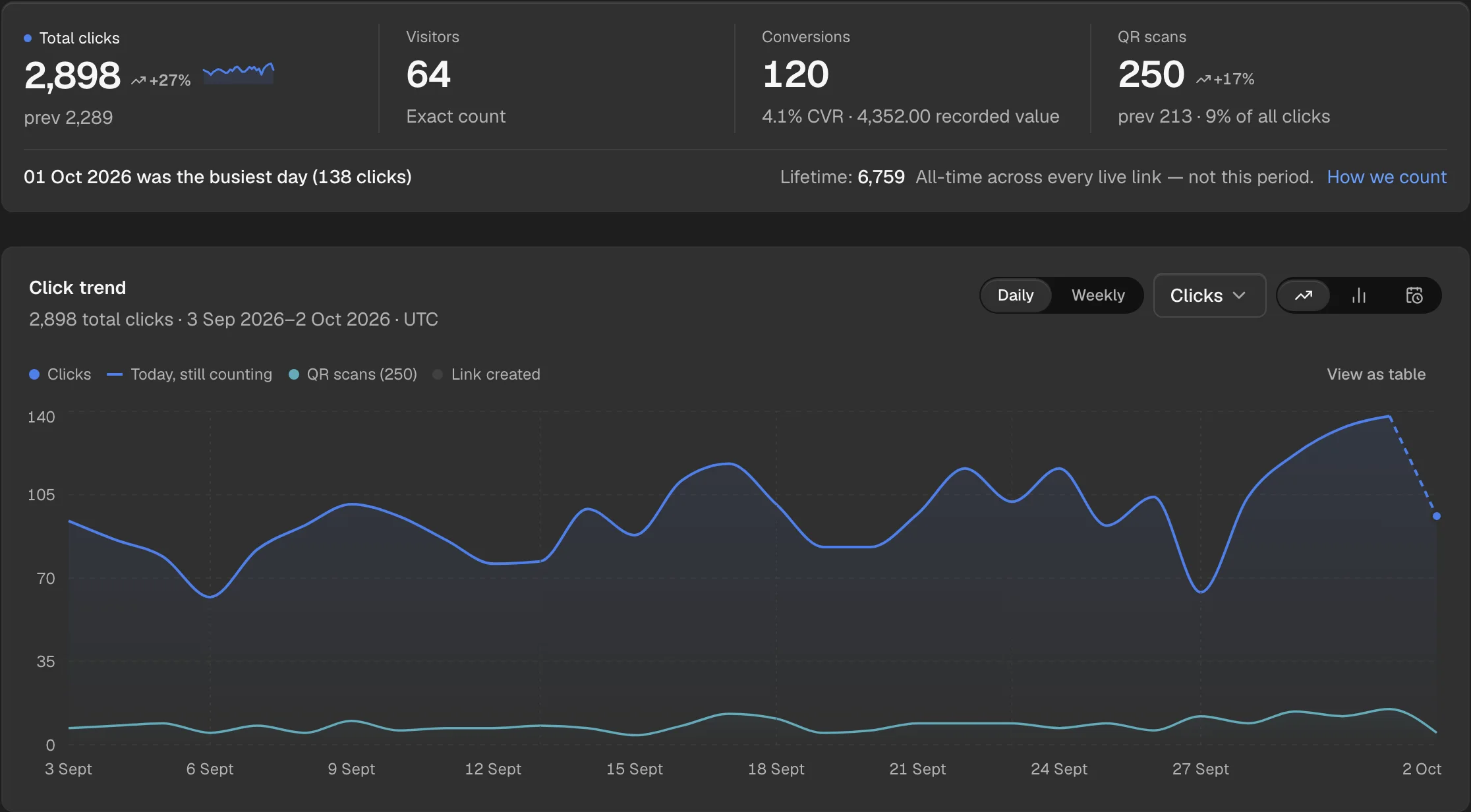
A real screen from an example workspace.


What you can measure
Every dimension your link data can tell you, out of the box, with no config.
- Clicks over time
- Daily click totals for any date range. Totals, lifetime counts and country, device, and (on Pro) referrer breakdowns refresh every hour.
- Top referrers
- Social, email, organic search, and direct: each source broken out with exact counts.
- Countries
- Country-level geographic breakdown. See which markets your audience actually comes from.
- Devices and browsers
- Mobile vs desktop vs tablet split on every plan. Browser breakdown is available from Pro.
- Daily activity heatmap
- A calendar heatmap of click volume by day on the account Analytics page, once the range is 14 days or longer.
- No setup required
- Every link records its clicks at the redirect, with no setup. No snippet, SDK, or cookie banner needed.
Cookieless link analytics
- No visitor profiles
- Daily unique counts are HyperLogLog estimates, with a documented standard error of 0.81%. By default no fingerprints and no individual records are stored; Audience analytics, which a workspace turns on itself, keeps a keyed hash of one random cookie ID.
- No tracking pixels
- Analytics happen at the redirect hop, before any page loads. No cross-site tracking, no third-party scripts.
- GDPR-friendly
- Nothing that constitutes personal data is stored per GDPR recital 26. ShortZen’s redirect adds no cookie for you to ask consent for. Whatever else your own site sets is still yours to declare.
Click totals within the hour
Act on a campaign while it is running, not just document it after.
- Free keeps 30 days. Upgrade for up to 730 days of history, enough for year-over-year comparisons.
Send the report out, or save the way you read it
Two things this page does that are easy to miss: publishing a read-only report, and keeping a filter you return to.
- Publish a read-only report
- Mint a link anyone can open without an account. It shows the workspace report for the range and filters you picked (not a single link), and it is the whole credential, so treat it like one. How many can be live at once depends on your plan (1 on Free, 20 on Business), each expiring after 90 days, and revoking one makes the page vanish immediately.
- Save a filter you keep coming back to
- Keep a combination of date range, folder, tag, domain and breakdown under a name, and reopen it in a click. Views are shared with everyone in the workspace, and are replaced rather than edited. 3 to 100 saved views on every plan, starting on Free.
Questions, answered
Is there a JavaScript snippet or cookie banner required?
No. ShortZen analytics run at the redirect layer, not in the browser. No snippet, tag manager, or cookie consent banner is needed on your site.
How are unique visitors counted?
Each day’s unique count is an estimate from HyperLogLog, a probabilistic algorithm with a documented standard error of 0.81%, so a visitor who returns on another day counts again. No individual visitor profiles or fingerprints are stored by default. A workspace that opts into Audience analytics also keeps a keyed hash of one random cookie ID.
How long is analytics data retained?
Free: 30 days. Starter: 90 days. Pro: 365 days. Business: 730 days. Data older than the retention window is automatically purged.
Can I export analytics to CSV or a BI tool?
Yes. CSV export is available from Starter from the account Analytics page and from each link's analytics page. The REST API (on every plan, including Free) returns aggregated click summaries by dimension for any BI pipeline, not a raw per-click event feed.
Which metrics come with which plan?
Every plan, including Free, gets click totals, unique visitors, countries, and devices, refreshed every hour. Referrer and browser breakdowns are included on Pro and Business.
How fresh are the numbers?
Every click is recorded at the redirect, and the counts and breakdowns (countries, devices, and referrers) refresh every hour.
Add click analytics to your first link, free
Every click is counted at the redirect, not sampled. Uniques are estimates, and no visitor’s IP is ever stored.